Using the Financial task
The Financial task in Heatpunk allows you to manage project pricing, configure payment options, and calculate running costs for a heat pump installation.
Getting started with the Financial task
You can access the Financial task via the 'Tasks' drop-down menu or from the task list to the left on the project overview page.
When the Financial task first opens, you'll be shown a popup that lets you configure the settings you want to use for the quote and projections. It will open on 'Pricing' and then you can use the left hand navigation to choose the settings you want to edit:
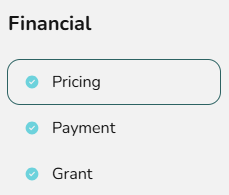
If you'd like to change these values at a later stage, click Financial inputs in the top right or edit specific options directly from the right-hand sidebar.

Financial task inputs
Expand each section below for more details on each setting.
Pricing
In this section you can configure pricing options, including a quick way to add on the UK Boiler Upgrade Scheme voucher grant. You can also configure the VAT settings for your project.
Pro subscription: If you have set up automatic pricing for your team, optional line items will be displayed here. You can choose which items to include and these will be added to the quote.
Payment
In this section you can configure how the customer will pay for the system, with the option to either pay in full or with finance. Any discounts or grants are configured in later sections but will be automatically factored in.
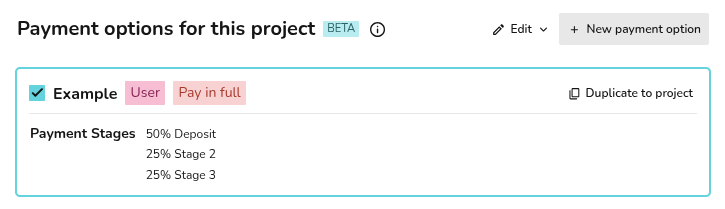
- Select from your pre-configured payment options for this project or create new ones. You can set default values for this section in your financial settings.
- If you'd like to amend an existing one for this project, you can just duplicate to project and edit any details or navigate to your financial settings by click Edit option at the top to edit the default option.
Learn more: Setting up payment options.
Note: A pay in full option is required on all projects, even if the customer intends to pay with finance.
Grant
If the project is eligible for a grant that will pay for some or all of the cost of the system, you can add it here.
Set the description, the value and whether this is claimed before or after the installation.

Still Need Help? / Want to know more?
Contact Support: If you've got further questions, get in touch with our support team at help@heatpunk.co.uk (UK) or help@heatpunk.ie (IE). If you are experiencing a bug, to help us look into your issue faster, please include the email address of your account, the name of the project and screenshots of any unexpected behaviour.