Pro: Team Management
This guide applies to pro versions of Heatpunk
Team management allows you to have control over who is on your Heatpunk Team and the permissions (role type) they have.
Managing your team
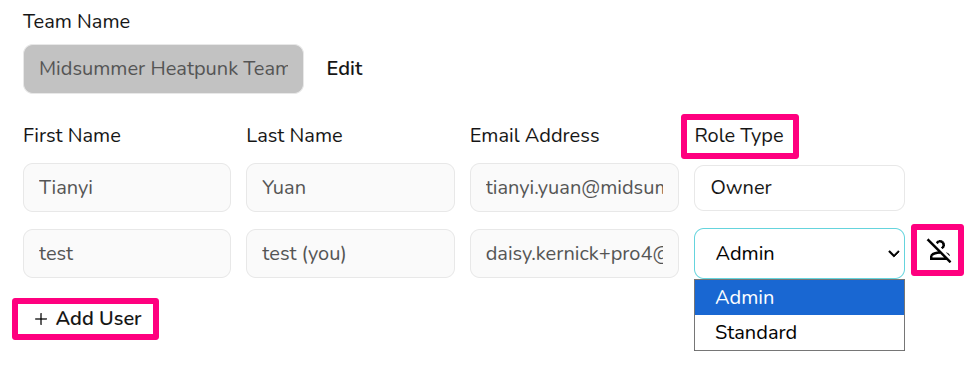
You can manage your team settings in Pro Account Settings > General. The team owner and any users with the admin role type can add and remove users, as well as change their role type.
Role types
With Heatpunk pro, different members of the team can have different levels of access. The roles available are:
- Admin: role includes the ability to view and manage Pro team settings.
- Owner: this is the user who set up the pro team and this role cannot be selected or changed. They have same permissions as admin but cannot be removed from the team, so make sure this is under an email address you can access even if the owner was to leave the company.
- Standard: can access all pro features within projects, but cannot view or edit the pro account settings.
Adding or removing users
To add users, you’ll need the individual’s name and email address (they do not need an existing Heatpunk account). You can then choose the user’s role. This role can be changed at anytime.

The cost for adding a new user will be proportional to how much time is left until your next charge date and subsequent direct debits will be automatically updated.
To remove a user, click on the icon beside their details. This will disable their account and remove them from the subscription. The owner account cannot be removed so ensure it is under a company email address.
Editing users
User names or email addresses cannot be edited here. This can only be done while logged into the relevant account. If you've made a typo when adding a new user to your team, get in touch with the support team.
See here for information on sharing projects and components between team members.
Still Need Help? / Want to know more?
Contact Support: If you've got further questions, get in touch with our support team at help@heatpunk.co.uk (UK) or help@heatpunk.ie (IE). If you are experiencing a bug, to help us look into your issue faster, please include the email address of your account, the name of the project and screenshots of any unexpected behaviour.