# 10. Managing surveys, troubleshooting & FAQs

### Managing surveys on your device

- **Find &amp; filter:** Open the `Surveys` tab to filter by status (`Not Scanned`, `Needs Attention`, `Ready to Send`, `Sent`), toggle between Gallery and List views, or use the `Search` tab to find a postcode or customer name
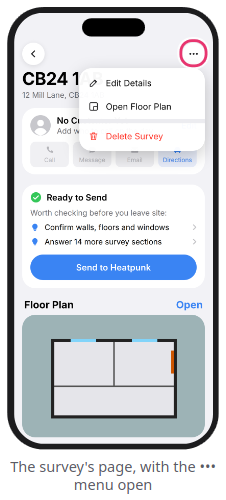
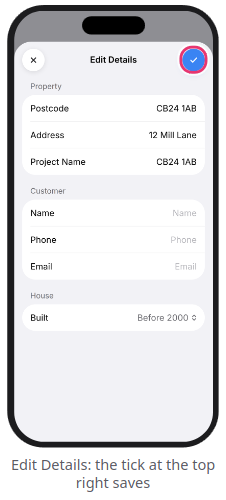
- **Edit details:** Open a survey, tap `...` &gt; `Edit Details`, make your changes, and tap the `blue tick`
- <span data-path-to-node="111,2,0,0">**Delete surveys:** Open a survey and tap `...` &gt; `Delete Survey` (or tap `...` &gt; `Select Surveys` on the Surveys tab to bulk delete)</span><span class="" data-path-to-node="111,2,0,1"><sup class="superscript"></sup></span><span data-path-to-node="111,2,0,2">. Surveys already marked `Sent` remain safely in your Heatpunk web account when deleted from your phone</span><span class="" data-path-to-node="111,2,0,3"><sup class="superscript"></sup></span>

<span data-path-to-node="111,2,0,2">[![Screenshot_20261119_140600.png](https://help.heatpunk.co.uk/uploads/images/gallery/2026-11/scaled-1680-/F1maxqPZa5sdFWci-screenshot-20261119-140600.png)](https://help.heatpunk.co.uk/uploads/images/gallery/2026-11/F1maxqPZa5sdFWci-screenshot-20261119-140600.png)[ ![Screenshot_20261119_140547.png](https://help.heatpunk.co.uk/uploads/images/gallery/2026-11/scaled-1680-/7bN4OajUwW6uveae-screenshot-20261119-140547.png)](https://help.heatpunk.co.uk/uploads/images/gallery/2026-11/7bN4OajUwW6uveae-screenshot-20261119-140547.png)</span>
<p class="callout warning"><span data-path-to-node="111,2,0,2"><span data-path-to-node="33,0,1,0,0">**Warning:** Deleting a survey that has never been sent to Heatpunk permanently erases it—always upload your survey first</span><span data-path-to-node="33,0,1,0,1"><sup class="superscript"></sup></span><span data-path-to-node="33,0,1,0,2">.</span> </span></p>

---

### FAQs

<span class="" data-path-to-node="114,0">**<span class="corp-icon material-symbols-rounded icon-expand mceNonEditable" style="user-select: none;">​</span>*Expand the sections below for information on common scanning, sending, and account questions*</span><span class="" data-path-to-node="114,1"><sup class="superscript"></sup></span>

<details id="bkmrk-%E2%9D%93-%C2%A0"><summary>❓Two rooms merged into one during a LiDAR scan</summary>

<span data-path-to-node="35,1,0,0">Wide openings between spaces or very cluttered floors can cause two rooms to read as one</span><span class="" data-path-to-node="35,1,0,1"><sup class="superscript"></sup></span><span data-path-to-node="35,1,0,2">. Fix this on the floor plan by resizing the room in the **Room Editor**, or close the door between the rooms and re-scan them separately</span><span class="" data-path-to-node="35,1,0,3"><sup class="superscript"></sup></span><span data-path-to-node="35,1,0,4">.</span>

</details><details id="bkmrk-%E2%9D%93-%C2%A0-1"><summary>❓The floor plan looks slightly skewed</summary>

<span data-path-to-node="37,1,0,0">Scans can occasionally drift by a degree or two, and the app automatically straightens slight offsets</span><span class="" data-path-to-node="37,1,0,1"><sup class="superscript"></sup></span><span data-path-to-node="37,1,0,2">. Deliberately angled walls (such as bay windows) are left angled on purpose</span><span class="" data-path-to-node="37,1,0,3"><sup class="superscript"></sup></span><span data-path-to-node="37,1,0,4">. If a room is still slightly off-square, select it on the floor plan and tap `Square Up` on the room card</span><span class="" data-path-to-node="37,1,0,5"><sup class="superscript"></sup></span><span data-path-to-node="37,1,0,6">.</span>

</details><details id="bkmrk-%E2%9D%93-%C2%A0-2"><summary>❓Inner walls are missing when I open the project on the Heatpunk website</summary>

<span data-path-to-node="39,1,0,0">Your rooms uploaded properly—the web floor plan simply calculates internal partition walls after a room is adjusted</span><span class="" data-path-to-node="39,1,0,1"><sup class="superscript"></sup></span><span data-path-to-node="39,1,0,2">. On the Heatpunk website's floor plan, drag any room slightly and drop it back into place; all internal walls will appear</span><span class="" data-path-to-node="39,1,0,3"><sup class="superscript"></sup></span><span data-path-to-node="39,1,0,4">.</span>

</details><details id="bkmrk-%E2%9D%93the-stop-button-sta"><summary>❓The stop button stays grey during a LiDAR scan</summary>

<span data-path-to-node="41,1,0,0">The scan requires at least **3 walls** to be detected before the stop button activates</span><span class="" data-path-to-node="41,1,0,1"><sup class="superscript"></sup></span><span data-path-to-node="41,1,0,2">. Keep sweeping the camera slowly around the room until 3 walls have been captured</span><span class="" data-path-to-node="41,1,0,3"><sup class="superscript"></sup></span><span data-path-to-node="41,1,0,4">.</span>

</details><details id="bkmrk-%E2%9D%93the-app-says-%22key-n"><summary>❓The app says "Key not accepted" or asks me to "Reconnect"</summary>

<span data-path-to-node="43,1,0,0">Your device key was removed on the website or your **Pro** subscription ended</span><span class="" data-path-to-node="43,1,0,1"><sup class="superscript"></sup></span><span data-path-to-node="43,1,0,2">. Generate a new QR code under `My Account` &gt; `Preferences` &gt; `Heatpunk App` on a computer, then open `Settings` in the app and tap `Reconnect`</span><span class="" data-path-to-node="43,1,0,3"><sup class="superscript"></sup></span><span data-path-to-node="43,1,0,4">. Your existing surveys remain safely on your phone</span><span class="" data-path-to-node="43,1,0,5"><sup class="superscript"></sup></span><span data-path-to-node="43,1,0,6">.</span>

</details><details id="bkmrk-%E2%9D%93i-got-a-new-phone-f"><summary>❓I got a new phone</summary>

<span data-path-to-node="45,1,0,0">First, send any unsent surveys from your old phone—they are stored locally on that device and are not in Heatpunk yet</span><span class="" data-path-to-node="45,1,0,1"><sup class="superscript"></sup></span><span data-path-to-node="45,1,0,2">. Then log in to the Heatpunk website, click `Remove` next to your old phone under **Your devices**, and generate a new QR code to connect your new phone</span><span class="" data-path-to-node="45,1,0,3"><sup class="superscript"></sup></span><span data-path-to-node="45,1,0,4">.</span>

</details>---

### Reporting issues &amp; contacting support

- **In-app tips:** Go to `Settings` &gt; `Help & Support` &gt; `Getting a Clean Scan` &gt; `Show Me` for a quick 6-step refresher
- <span class="" data-path-to-node="117,1,0,0">**Send Feedback / Report a Bad Scan:** In `Settings` &gt; `Help & Support`, tap `Send Feedback` (to attach diagnostic logs) or `Report a Bad Scan` (to attach the raw scan `.zip` file)</span><span class="" data-path-to-node="117,1,0,1"><sup class="superscript"></sup></span><span data-path-to-node="117,1,0,2">. Neither report includes customer personal details</span><span class="" data-path-to-node="117,1,0,3"><sup class="superscript"></sup></span>
- <span class="" data-path-to-node="117,1,0,3"><span class="" data-path-to-node="117,2,0,0">**Email Support:** Contact <help@heatpunk.co.uk> with your account email, survey **Reference** (`#HP-...`), device model, and the app **Version** (found in `Settings`)</span><span class="" data-path-to-node="117,2,0,1"><sup class="superscript"></sup></span> </span>

<span class="" data-path-to-node="117,1,0,3"><span class="" data-path-to-node="117,2,0,0">[![Gemini_Generated_Image_oyzjyroyzjyroyzj.jpeg](https://help.heatpunk.co.uk/uploads/images/gallery/2026-11/scaled-1680-/Is9A1SwQbqx9l6Zg-gemini-generated-image-oyzjyroyzjyroyzj.jpeg)](https://help.heatpunk.co.uk/uploads/images/gallery/2026-11/Is9A1SwQbqx9l6Zg-gemini-generated-image-oyzjyroyzjyroyzj.jpeg)</span></span>

---

### <span class="corp-icon material-symbols-rounded icon-support mceNonEditable" style="user-select: none;">​</span>Still Need Help?

**Contact Support:** If you've got further questions, get in touch with our support team at **help@heatpunk.co.uk** (UK) or **help@heatpunk.ie** (IE). *If you are experiencing a bug, to help us look into your issue faster, please include the email address of your account, the name of the project and screenshots of any unexpected behaviour.*