# Floor Plan Update - April 2026
[](https://help.heatpunk.co.uk/uploads/images/gallery/2026-04/gSNPRTJD07mH6hSs-floor-plan-ui-light-stacked.png)
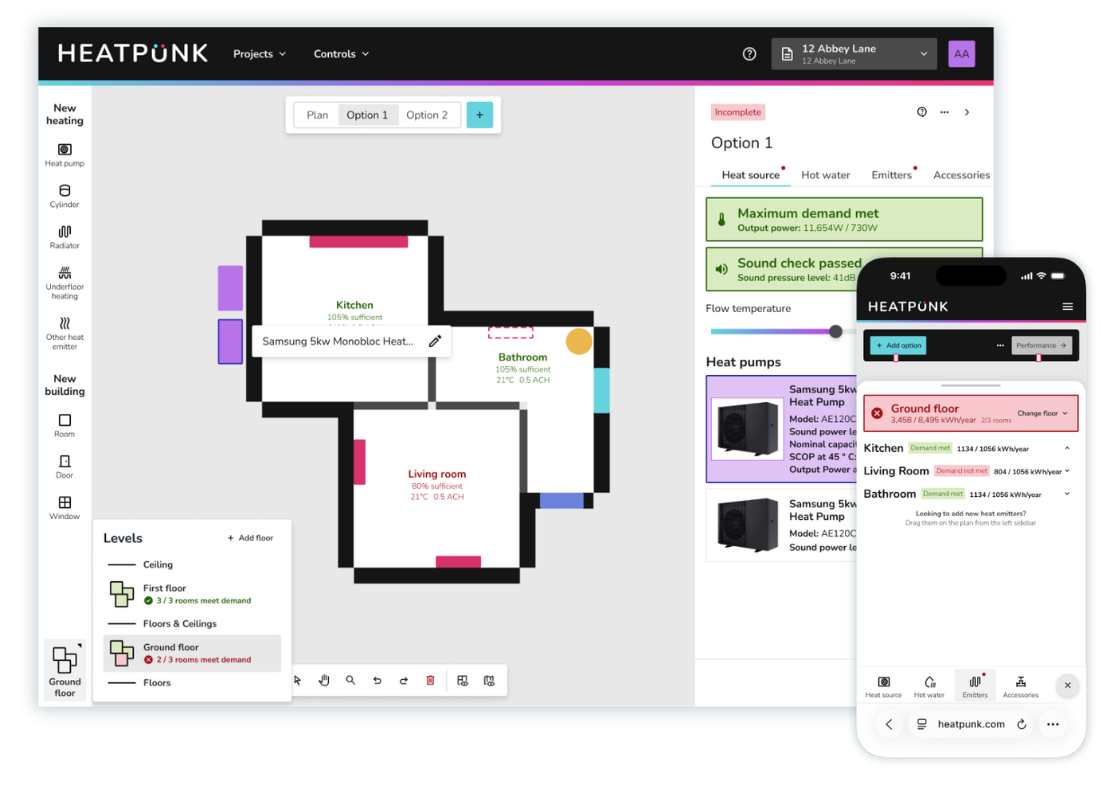
We are excited to announce a major update to Heatpunk. This update changes the way you manage floor plans and specify design options. The new workflow is faster, clearer, and brings your plans and system design together in a single place. Watch the short explainer video below or read on for more details about what's changed.
---
What's changed
The Plans Task and Heat Pump Task have been merged into one new improved task. This will make it easier than ever to manage the surveyed floor plan, calculate room-by-room heat loss and configure system design options. As well as an improved UI, there's some powerful new features included, including support for multiple heat pumps and cylinders and the ability to show the location of these on the floor plan for each design option.
#### Surveyed floor plan
##### **See heat loss calculations as you build the floor plan**
Build your floor plan as you did before but now with heat loss calculations visible directly on the floor plan as you work on it. A powerful new sidebar tool incorporates lots of new functionality that lets you adjust the flow temperature and see a breakdown of the as-surveyed heat loss calculations, emitter specifications and understand how much of the heat demand for each room is met. You have the option to see a more detailed popup showing all the room details.
##### **Add existing underfloor heating to the surveyed floor plan**
As well as recording the details of existing radiators you can now also capture details of existing underfloor heating on the surveyed floor plan.
##### **Add notes for each room while you survey the property**
You can add important notes about each room such as customer preferences, existing pipe routes and electrics, etc. These notes can be viewed on the floor plan and will be displayed in the technical report.
##### **Copy and paste rooms, doors, windows and heat emitters**
You can copy and paste existing items on the floorplan using keyboard shortcuts. Select the element you wish to copy, then type the keyboard shortcut `CTRL` + `C` followed by `CTRL` + `V` to paste it. On an Apple computer the keyboard shortcuts are `CMD` + `C` and `CMD` + `C`.
#### System design options
##### **System design options now each have their own version of the floor plan**
You can now show the proposed location of heat pump(s) and hot water storage cylinders on the floor plan. You can also specify the location of new radiators.
##### **Heat pump and cylinder locations shown on floorplan**
When designing a system, you can drag heat pumps and cylinders onto the floor plan to show their proposed locations.
##### **Designs systems with multiple/cascaded heat pumps**
You can now design systems with multiple heat pumps. Simply add additional heat pumps to your system design by dragging them onto the floor plan.
##### **View full room details and floor plan dimensions**
You'll now find room details within the emitters section of the new sidebar. For each room click 🡥 See room details**. This menu has the additional option to view all dimensions for that floor.
---
### Help guidesView all our help guides covering the updates [here](https://help.heatpunk.co.uk/books/plans-task). An overview of the functionality can be found on [Introduction to the Plan Task](https://help.heatpunk.co.uk/books/plans-task/page/introduction-to-the-plans-task).