# Sources

### Adding a heat pump 

<span style="color: rgb(224, 62, 45);">[![Heatpumpplacement.gif](https://help.heatpunk.co.uk/uploads/images/gallery/2026-04/PTdus0mdBXPnJVGo-heatpumpplacement.gif)](https://help.heatpunk.co.uk/uploads/images/gallery/2026-04/PTdus0mdBXPnJVGo-heatpumpplacement.gif)</span>

Heat pumps are added to a design within the [***Plan task***](https://help.heatpunk.co.uk/books/plans-task/page/introduction-to-the-plans-task "Introduction to the Plan Task").

While on a [design option](https://help.heatpunk.co.uk/books/plans-task/page/surveyed-plan-and-design-options "Plans and Design Options"), drag and drop a *Pump* from the left-hand sidebar to place a heat pump in the plan. After placing the heat pump, you can select the model. Choose from the **recommendations** or scroll through the sections on the left, sorted by **brand and type** (monoblock and split).

When a heat pump is selected, on the right you will see specs, and Midsummer stock levels and pricing. If your account is [connected to Midsummer](https://help.heatpunk.co.uk/books/getting-started/page/connecting-to-midsummer "Connecting to Midsummer"), you will also see your specific pricing.

### Sources tab

On the *Sources* tab, you will see:

[![image.png](https://help.heatpunk.co.uk/uploads/images/gallery/2026-04/scaled-1680-/1KLixuYD0iQnfl8d-image.png)](https://help.heatpunk.co.uk/uploads/images/gallery/2026-04/1KLixuYD0iQnfl8d-image.png)

- Total heat pump output / maximum demand
- Sound check information (UK only): choose sound check method and complete sound check for each heat pump
- Outside design temperature (ODT) settings
- Details of selected heat pumps

#### Heat pumps

[![image.png](https://help.heatpunk.co.uk/uploads/images/gallery/2026-04/scaled-1680-/UCM2P6iRIjxVzv6Z-image.png)](https://help.heatpunk.co.uk/uploads/images/gallery/2026-04/UCM2P6iRIjxVzv6Z-image.png)

To **edit** or **delete** the selected heat pump(s), either delete directly from the design option floor plan or navigate to the *Sources* tab where you can:

<table border="1" id="bkmrk-%C2%A0-pencil%3A-edit-selec" style="border-collapse: collapse; width: 92.1429%; height: 240px; background-color: rgb(255, 255, 255); border: 1px hidden rgb(255, 255, 255);"><colgroup><col style="width: 9.81912%;"></col><col style="width: 90.1809%;"></col></colgroup><tbody><tr style="height: 69.5px;"><td style="height: 69.5px; text-align: justify; border-color: rgb(255, 255, 255);">[![Edit.jpg](https://help.heatpunk.co.uk/uploads/images/gallery/2026-04/scaled-1680-/ZXEkzMpqNIMrgUR3-edit.jpg)](https://help.heatpunk.co.uk/uploads/images/gallery/2026-04/ZXEkzMpqNIMrgUR3-edit.jpg)</td><td style="height: 69.5px; border-color: rgb(255, 255, 255);">**Edit heat pump**

Re-open the heat pump selector menu to change the heat pump.

</td></tr><tr style="height: 70px;"><td style="height: 70px; text-align: justify; border-color: rgb(255, 255, 255);">[![image.png](https://help.heatpunk.co.uk/uploads/images/gallery/2026-04/scaled-1680-/eCyT19q8ARDdtQEa-image.png)](https://help.heatpunk.co.uk/uploads/images/gallery/2026-04/eCyT19q8ARDdtQEa-image.png)

</td><td style="height: 70px; border-color: rgb(255, 255, 255);">**Show all details**

Show/hide the nominal capacity and ENA registration number.

</td></tr><tr style="height: 31px;"><td style="text-align: justify; border-color: rgb(255, 255, 255); height: 31px;">[![image.png](https://help.heatpunk.co.uk/uploads/images/gallery/2026-04/scaled-1680-/evzlTJfSqao4f6FL-image.png)](https://help.heatpunk.co.uk/uploads/images/gallery/2026-04/evzlTJfSqao4f6FL-image.png)

</td><td style="border-color: rgb(255, 255, 255); height: 31px;">**Sound check**

Complete sound check for this heat pump. Read more about this below.

</td></tr><tr style="height: 69.5px;"><td style="height: 69.5px; text-align: justify; border-color: rgb(255, 255, 255);">[![image.png](https://help.heatpunk.co.uk/uploads/images/gallery/2026-01/scaled-1680-/yXEEcfO2NaTOkGHU-image.png)](https://help.heatpunk.co.uk/uploads/images/gallery/2026-01/yXEEcfO2NaTOkGHU-image.png)</td><td style="height: 69.5px; border-color: rgb(255, 255, 255);">**Delete heat pump**

Remove heat pump from this design option.

</td></tr></tbody></table>

For each heat pump, you can see:

- Model
- Sound power level (dB)
- SCOP at flow temperature
- Output at flow temperature

On the heat pump, click **⋯ (three dots)** &gt; **Show all details** to also display the nominal capacity and ENA registration number (UK).

Adjust the **flow temperature** at the top of the right-hand sidebar:

[![FlowTempAndOutput.gif](https://help.heatpunk.co.uk/uploads/images/gallery/2026-04/dI6RraM3jec3W0kZ-flowtempandoutput.gif)](https://help.heatpunk.co.uk/uploads/images/gallery/2026-04/dI6RraM3jec3W0kZ-flowtempandoutput.gif)

#### Completing the sound check (UK only)

Once you have added a heat pump, you can complete the sound check for that heat pump. On the *Sources* tab, where it says *sound check incomplete*, click the **⋯ (three dots)** and then the name of the heat pump(s).

[![SoundCheck.gif](https://help.heatpunk.co.uk/uploads/images/gallery/2026-04/b6HkzGtANVymDUKd-soundcheck.gif)](https://help.heatpunk.co.uk/uploads/images/gallery/2026-04/b6HkzGtANVymDUKd-soundcheck.gif)

Once you have completed the sound check for all heat pumps in the design option, the result will be displayed in the same section:

[![SoundCheckPassFail.gif](https://help.heatpunk.co.uk/uploads/images/gallery/2026-04/5D6gX7m4V6bKcfGz-soundcheckpassfail.gif)](https://help.heatpunk.co.uk/uploads/images/gallery/2026-04/5D6gX7m4V6bKcfGz-soundcheckpassfail.gif)

<p class="callout info">Sound checks on multiple heat pumps can only be completed using MCS 020 a) (2025 method). **Read more about the [sound check](https://help.heatpunk.co.uk/books/plans-task/page/sound-check-uk "Sound Check (UK)").** </p>

#### Editing ODT settings

To change the ODT for the project, select ⚙ *Outside design temperature* next to *heat pumps*:

[![image.png](https://help.heatpunk.co.uk/uploads/images/gallery/2026-04/scaled-1680-/rx5LJ8IaSuZy1W8R-image.png)](https://help.heatpunk.co.uk/uploads/images/gallery/2026-04/rx5LJ8IaSuZy1W8R-image.png)
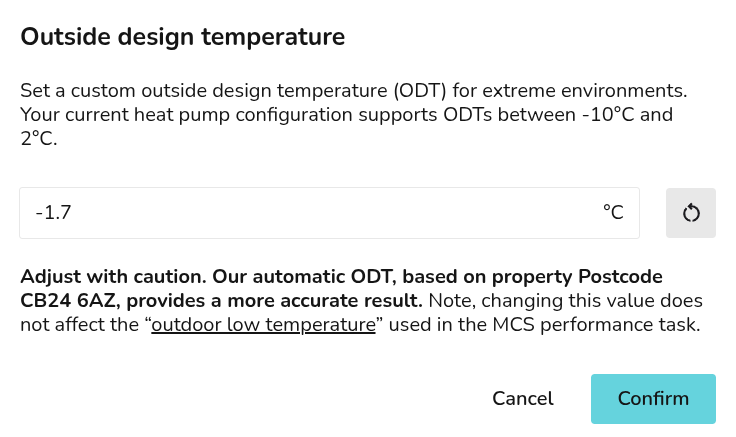
Read more about [ODT in Heatpunk](https://help.heatpunk.co.uk/books/new-in-heatpunk/page/changes-to-outdoor-design-temperatures-odt "Changes to outdoor design temperatures (ODT)").

---

If you have further questions, please get in touch at <help@heatpunk.co.uk> or <help@heatpunk.ie>.