
7. Survey questions & photo markups
The app includes all 14 standard Heatpunk survey sections. You can complete them on site without signal, and your answers save automatically.
Answering survey questions
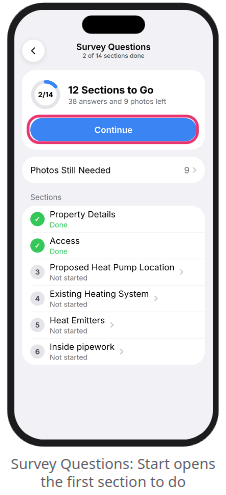
- Open the survey's page and tap the
Survey Questionscard (or tap...>Surveyduring a room walk). - Tap
StartorContinueto work through the remaining sections in order, or tap any individual section from the list. - For photo questions, tap
Take Phototo capture a new image, orFrom Projectto reuse a photo you already took during the room walk. - Tap
Photos Still Neededat the top of the Survey Questions screen to view a checklist of any missing photos.
List of the 14 survey sections
-
Property Details (Outside)
-
Access (Outside)
-
Proposed Heat Pump Location (Outside)
-
Existing Heating System
-
Heat Emitters
-
Inside pipework
-
Domestic Hot Water Supply
-
Proposed cylinder location
-
Energy Use
-
Electrical System
-
Wiring route (Outside)
-
Pipe runs (Outside)
-
Vents (optional)
-
Additional information
Marking up photos & drawing pipework
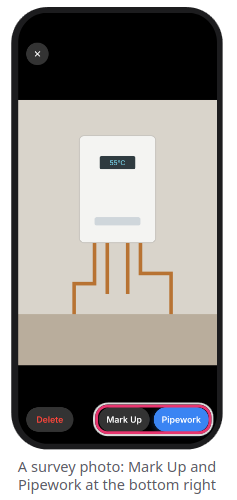
You can annotate photos to clearly show installers where equipment, pipe runs, and cables will go.
- Tap any photo to open it full-screen.
- General annotations: Tap
Mark Upto draw freehand or add shapes and text using Apple's markup tools, then tapDone(a clean original is always preserved in the background). - Pipework & cable routing (available on survey question, radiator, boiler, and stopcock photos):
- Tap
Pipeworkat the bottom right - Tap
Route, select the pipe or cable type (Flow & Return,Hot Water,Cold Main,Condensate,Power Cable,Controls Cable, etc.) and diameter (e.g.,22 mm), then tap along the photo to plot each bend and tapFinish - Tap
Markto place icons forHeat Pump,Core Hole,Cylinder,Isolator,Consumer Unit,Valve, or aNote - Tap
Doneat the top right to save the annotated image
- Tap
Note: Deleting a photo from a room removes it from the entire survey and any linked questions. Deleting a photo from a survey question removes it only from that question.
Still Need Help? / Want to know more?
Contact Support: If you've got further questions, get in touch with our support team at help@heatpunk.co.uk (UK) or help@heatpunk.ie (IE). If you are experiencing a bug, to help us look into your issue faster, please include the email address of your account, the name of the project and screenshots of any unexpected behaviour.