
Hot Water Storage
This guide covers and update coming to Heatpunk UK April 27th 2026. Read more about it here. View the old version here.
Heatpunk helps you specify a hot water storage solution that's compatible with selected heat pump and sized based on property details. Once selected, you can view specs, domestic hot water (DHW) calculations and Legionella calculations.
You can fine tune these calculations for the specific requirements of the installation and share these details with customer in the technical report and customer proposal.
Adding hot water storage
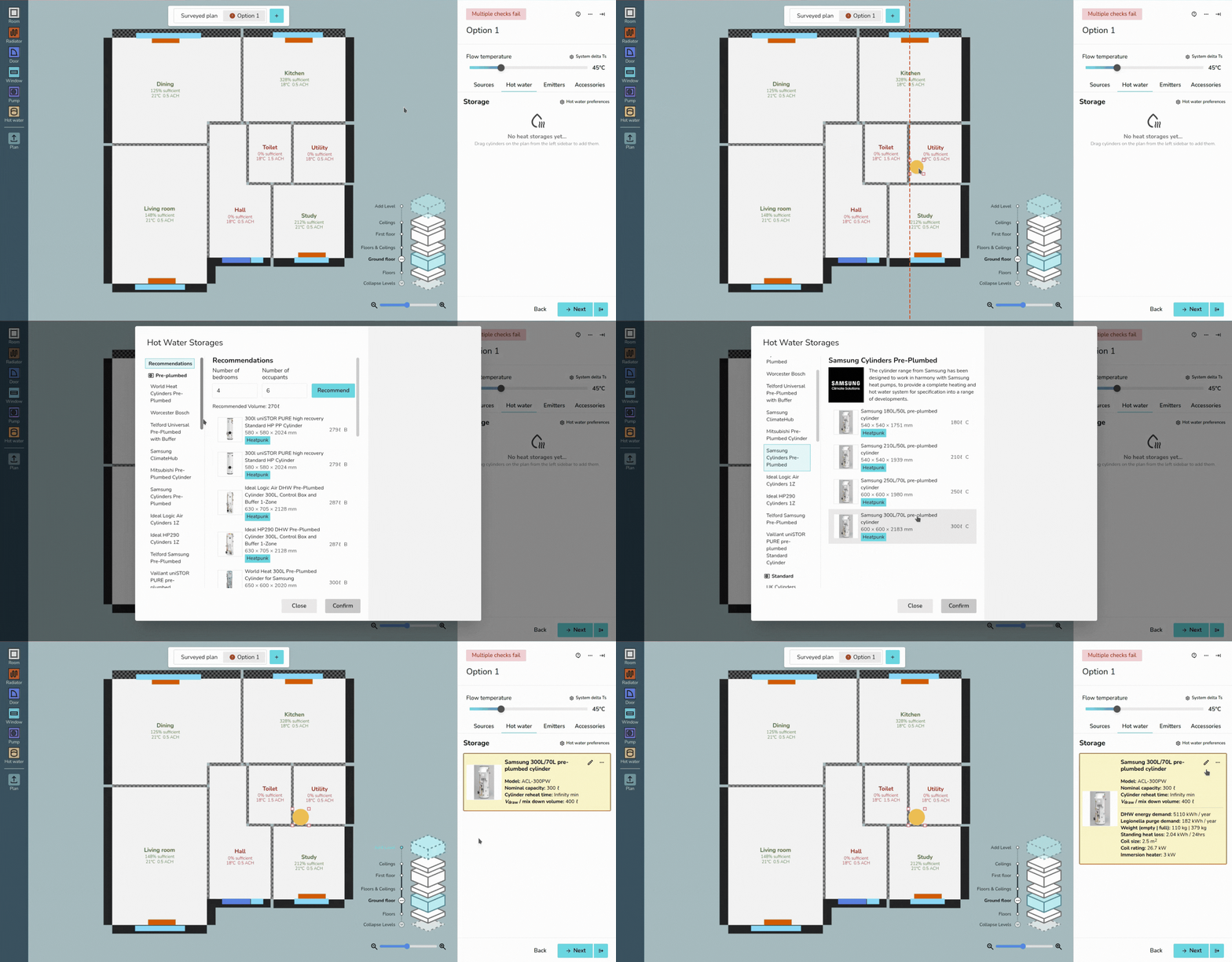
Hot water storage is selected in the Heat PumpPlan task.
While youon firsta enterdesign option, drag and drop hot water storage from the Heatleft-hand Pumpsidebar task,to afterplace selecting a heat pump you will be shown a list of recommended options.
If you initially did not includethe hot water storage in the project,plan. navigateAfter toplacing the Heat Pump task, on the left below the 'Heat Pump Load' sectionit, you willcan see the 'Hot Water Storage' section. Click the pencil icon to add hot water storage.

Selectingselect a hot water storage option
When selecting hot water storage, you can select from the recommendations or scroll through the optionssections on the left tosorted pickby frombrand theand type (pre-plumbed, standard, pre-plumbed slimline, slimline and horizontalhorizontal). cylinder
How are incompatible with the selectedrecommended heatoptions pump say 'incompatible with selected heat pump' in red text.
When you have an option selected, to the top right, you will see spec information and bottom right Midsummer stock information. If your account is connected to Midsummer, you will also see your specific pricing.
Hot water storage recommendations
chosen?
Recommendations are based on compatibility with the heat pump and are sized according to the number of bedrooms and occupants. Adjust the number of bedrooms/occupants and click Recommend to get updated recommendations.

How is the recommended volume calculated?
This is calculated using the MCS method for DHW demand:
Recommended volume = 45 * N
where N is the greater of:
- The number of rooms + 1
- The number of known occupants
Editing
When hotyou waterhave storagean inoption aselected, projecton
Youthe right you will see specs, and Midsummer stock levels and pricing. If your account is connected to Midsummer, you will also havesee your specific pricing.
Hot water
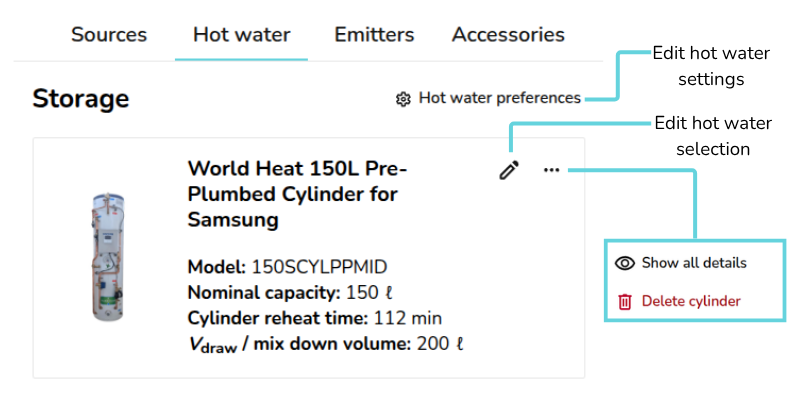
On the followingHot optionswater totab on the topright-hand rightsidebar, ofyou will see the Hotfollowing: Water
|
Hot water preferences Edit DHW and Legionella calculations. Read more about this below. |
 |
Pencil Edit hot water selection for this design option |
|
|
|
|
|


SystemHot water storage details and DHW calculations
OnceYou you'vecan selectedview adetails for the chosen hot water storage option, you can see the option in the Hot Waterwater Storagetab: section of the Heat Pump task. Here you will see all the specifications and the following calculations:
- Model
- Nominal capacity (ℓ)
- Cylinder re-heat time (min)
DHW energy demand (kWh/year)- Vdraw/Mix down volume (ℓ)
On the cylinder, click ⋯ three dots > Show all details to view the following additional details:
- DHW energy demand (kWh/year)
- Legionella Purge Demand (kWh/year)
- Weight (empty | full) (kg)
- Standing heat loss (kWh / Hrs)
- Coil size (m2)
- Immersion heater power (kW)
TheseThis detailsinformation areis then given in the 'Hot Water Calculations'Calculations page of the Technical report and Customer proposal for you to share with the customer.
How is DHW energy demand calculated?
DHW energy demand is calculated using the storage temperature, supply temperature, number of occupants and the water needed per person.
First the volume of water needed per year is calculated with the following calculation:
Volume per year = number of occupants * the water needed per person * 365
Noting that for water, volume (L) = mass (kg). Then using the specific heat capacity of water (kJ/kg°C), this is converted to kWh/year:
DHW energy demand = 4.2 * (1/3600) * mass per year * (storage temperature - supply temperature)
Adjusting DHW and Legionella calculations
These calculations can be fine tuned by editing the hotHot water storagepreferences settings. Clickingon the cogHot iconwater tab:
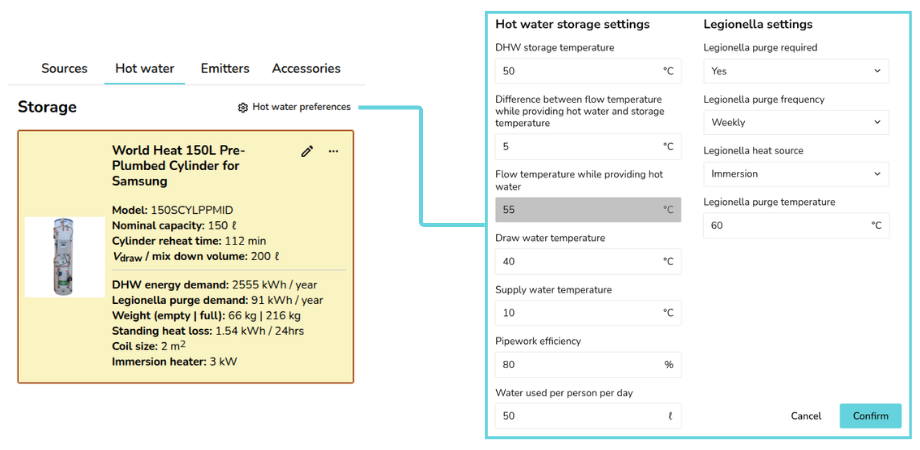
This will give you the following options to edit:edit under Hot water storage settings:
- DHW Storage Temperature (°C)
- Difference between flow temperature while providing hot water and storage temperature (°C)
- Flow Temperature while providing hot water (°C) (This is calculated based on the two previous inputs)
- Draw Water Temperature (°C)
- Supply Water Temperature (°C)
- Pipework Efficiency (%)
- Water used per person per day (ℓ)
Under 'Legionella settings', you then have the followingthese options:
- Legionella purge required (Yes/No)
- Legionella purge frequency (Weekly/Daily)
- Legionella heat source (Immersion/Heat pump)
- Legionella purge temperature (°C)
Changes to these settings will only affect the selected design option.
Take a look at our Plan task guides for more info. If you have further questions, please get in touch on help@heatpunk.co.uk or help@heatpunk.ie.