New in Heatpunk
- Partner spotlight: ESBE hydronic solutions
- New in May 2026
- Floor Plan Update - April 2026
- Heatpunk Pro: help your team work more efficiently
- 2025 end of year recap
- New in March 2025
Partner spotlight: ESBE hydronic solutions
 Founded in Sweden in 1906, ESBE engineers and manufactures hydronic solutions with a strict focus on safety, energy savings, and long-term reliability. We selected ESBE as a partner because they rigorously test all products in their own facilities in Reftele, Sweden, before market release.
Furthermore, their newly established UK subsidiary, led by Managing Director Darren Myers, provides installers with direct, local access to calculations, dimensioning, and technical support.
Technical focus: managing Kvs and differential pressure
Key ESBE components for heat pump systems
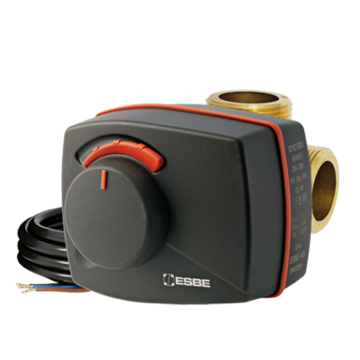 |
VRG Rotary Valves & ARA Actuators
VRG valves are premium 3-way valves featuring a compression fitting, suitable for both mixing and diverting operations. They are designed to pair directly with the ARA 2-point actuators. They fit together without the need for complicated connections or linkages, ensuring quick installation and highly accurate flow regulation.
Superb regulation for best double mixing performance | Long lasting and high durability |
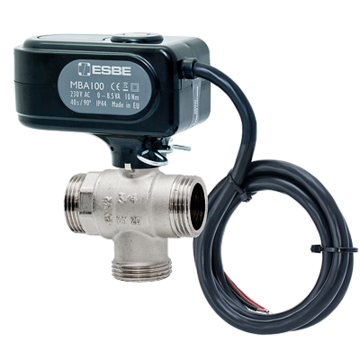 |
MBA Motorised Ball Valves
These 2-way and 3-way valves feature a pre-mounted actuator connected by a metallic spigot for secure and rapid assembly. They provide airtight closing compliant with EN12266-1. Because of their high Kvs and high shut-off pressure, they are a highly durable alternative to standard diverters in high-flow systems.
Auxiliary switch included | Anti-condensation resistor to prevent condensation | Easy to install |
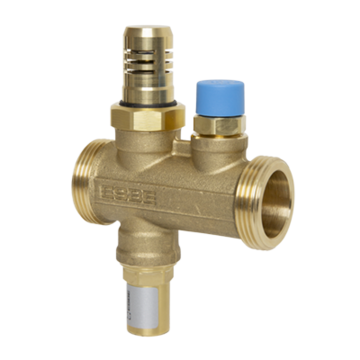 |
VTN Anti-Freeze Valves
A maintenance-free mechanical safeguard for monobloc heat pumps. In the event of a power outage, the valve's thermostat detects if the media temperature drops below 3ºC and automatically drains the system to prevent catastrophic freezing. It features an axial seal to prevent sticking, requires no electricity, and will automatically close itself once temperatures rise above 4ºC without needing a manual reset.
Exact temperature regulation | Robust & maintenance free |
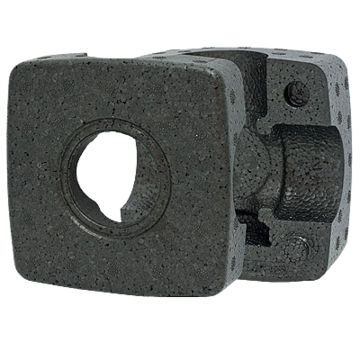 |
VRI Insulation Shells
Designed specifically for the VRG valve series, these shells reduce valve heat loss by 65%, further optimising the efficiency of the heating circuit. Insulation according to EnEV2009 | Tight seal | Avoid burning injures from hot valves |
How to specify ESBE products in Heatpunk
- When building your heat pump system in Heatpunk you'll be able to select Additional components once you have selected a heat pump.
- Select the specific ESBE valves, actuators, or insulation shells required for your system. Make sure you remove any other automatically selected components you no longer need.
- Once selected, these components will be included in the full bill of materials (shown on the project overview page) and will be included within the kit costs in the Financial task.
Discover the ESBE story
New in May 2026
Updates
- Heatpunk UK has been updated to enact various MCS changes to operating temperature and air change rates.
- Operating temps for post-2006 buildings have been increased in almost all rooms.
- Air change rates now default to 0.5 for all rooms except internal.
- Using the standard ventilation method now uses a fixed default air permeability of 12 m³/h.m² @ 50 Pa rather than using an occupancy-based estimator as before.
- Skip button added to consumption task menu.
Fixes
- Correction to post-2006 room temperatures when using specified air permeability.
- Fix to errors caused by deleting region corner with a height.
- Floor plan task can now handle materials that have u-value of 0.
- Sidebar displays correctly when opening material library from home page.
- Fix to floor plan PDF upload when there is more than one page.
- Emails no longer all show as sent based on one email.
Floor Plan Update - April 2026
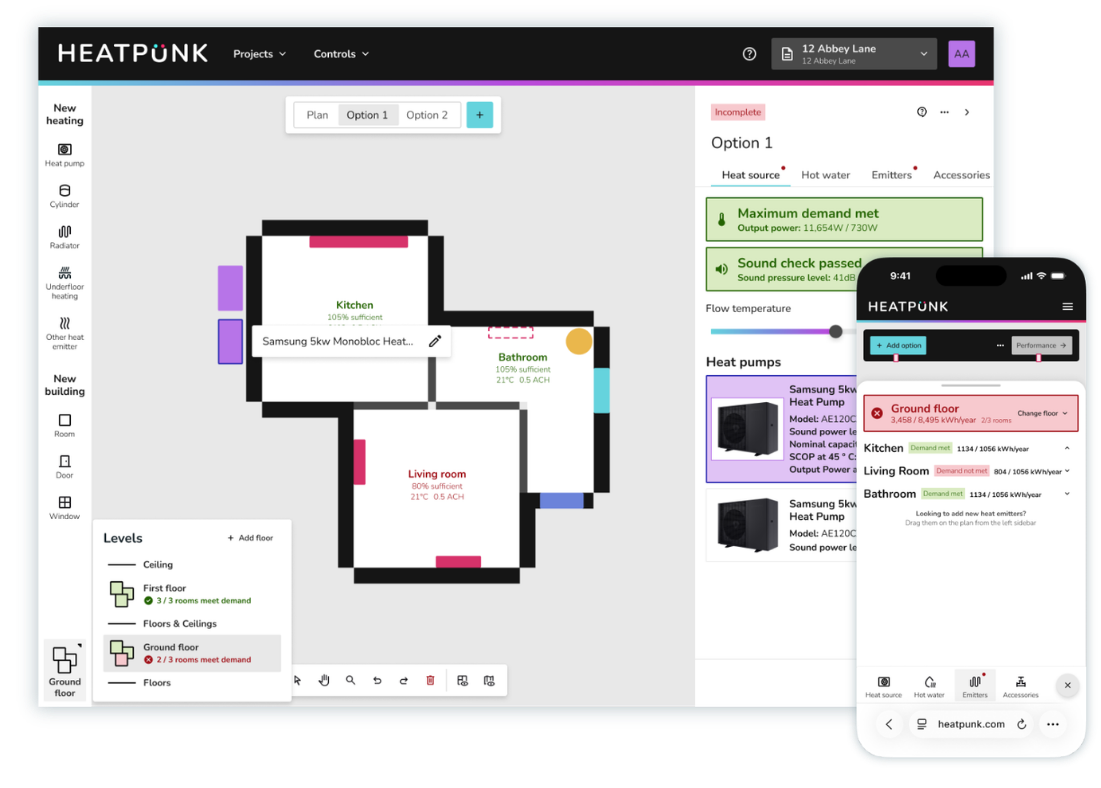
We are excited to announce a major update to Heatpunk. This update changes the way you manage floor plans and specify design options. The new workflow is faster, clearer, and brings your plans and system design together in a single place.
Watch the short explainer video below or read on for more details about what's changed.
What's changed
The Plans Task and Heat Pump Task have been merged into one new improved task. This will make it easier than ever to manage the surveyed floor plan, calculate room-by-room heat loss and configure system design options. As well as an improved UI, there's some powerful new features included, including support for multiple heat pumps and cylinders and the ability to show the location of these on the floor plan for each design option.
Surveyed floor plan
See heat loss calculations as you build the floor plan
Build your floor plan as you did before but now with heat loss calculations visible directly on the floor plan as you work on it. A powerful new sidebar tool incorporates lots of new functionality that lets you adjust the flow temperature and see a breakdown of the as-surveyed heat loss calculations, emitter specifications and understand how much of the heat demand for each room is met. You have the option to see a more detailed popup showing all the room details.
Add existing underfloor heating to the surveyed floor plan
As well as recording the details of existing radiators you can now also capture details of existing underfloor heating on the surveyed floor plan.
Add notes for each room while you survey the property
You can add important notes about each room such as customer preferences, existing pipe routes and electrics, etc. These notes can be viewed on the floor plan and will be displayed in the technical report.
Copy and paste rooms, doors, windows and heat emitters
You can copy and paste existing items on the floorplan using keyboard shortcuts. Select the element you wish to copy, then type the keyboard shortcut CTRL + C followed by CTRL + V to paste it. On an Apple computer the keyboard shortcuts are CMD + C and CMD + C.
System design options
System design options now each have their own version of the floor plan
You can now show the proposed location of heat pump(s) and hot water storage cylinders on the floor plan. You can also specify the location of new radiators.
Heat pump and cylinder locations shown on floorplan
When designing a system, you can drag heat pumps and cylinders onto the floor plan to show their proposed locations.
Designs systems with multiple/cascaded heat pumps
You can now design systems with multiple heat pumps. Simply add additional heat pumps to your system design by dragging them onto the floor plan.
View full room details and floor plan dimensions
You'll now find room details within the emitters section of the new sidebar. For each room click 🡥 See room details. This menu has the additional option to view all dimensions for that floor.
Help guides
View all our help guides covering the updates here. An overview of the functionality can be found on Introduction to the Plan Task.
Heatpunk Pro: help your team work more efficiently
Running a renewable heating business today means juggling a lot at once: fast‑moving leads, complex designs, tight installation schedules, regulatory paperwork and a customer base that expects clarity at every step. As your team grow, the challenges grow too, from more people touching the same projects, more room for inconsistency, and more opportunities for things to slip through the cracks.
Heatpunk Pro is designed to give installers a shared workspace where projects stay organised, pricing stays consistent and communication stays clear. Instead of relying on scattered tools and manual processes, Pro features help your team work in a single, structured environment from first contact to final handover.
1. Team-wide settings and workflows
As teams grow, consistency becomes one of the biggest challenges. Two designers might price the same job differently. A surveyor might forget a detail that slows down the installation. Someone might save documents in the wrong place, leaving others searching for information. Pro tackles this by giving your team a shared place to work end ensures everyone works in the same way.
-
Team‑wide settings ensure everyone uses the same components, defaults and pricing logic.
-
Role‑based controls protect sensitive information and prevent accidental changes.
-
Shared project access means anyone can pick up where someone else left off.
- Configure email sending to come from an email address you own.
Read more about managing Pro team settings.
 2. Quick lead generation & price estimates

The early stages of a heat pump sale are often where teams lose the most time. You need to qualify interest quickly, understand whether a customer is a good fit and produce a proposal that’s accurate enough to move the conversation forward – all without sinking hours into manual calculations. Heatpunk Pro can help in two ways.
Generate and qualify leads with Shrunk Punk
Shrunk Punk is a paid add‑on that works alongside Heatpunk Pro. Once enabled, you can embed the tool on your website and quickly give visitors an idea of the size of the heat pump they would need to heat their home - all without you lifting a finger! You can use your Pro team pricing rules to quickly follow up with an instant estimate via email. It helps you capture interest early, filter out low‑intent enquiries and focus your time on customers who are genuinely ready to move forward. Leads will appear in the Heatpunk leads dashboard for all your team to access, and you can convert them to a full project in a single click. Find out how to get set up with Shrunk Punk.
3. Integrated survey functionality
The value of surveys and capturing all the information required for a successful installation is often overlooked. Pro's built in survey features make it easy to ensure your team can do this efficiently.
-
Pre-installation survey tasks Surveyors can complete a standardised survey directly within the project. This ensures all required information (like building fabric details, electrical setup, access notes, customer preferences) is captured consistently and passed cleanly to the design and installation teams.
-
Installation record tasks After the job is complete, installers can record key details in a structured installation record. This creates a consistent, auditable record of what was installed, how it was configured and any site‑specific notes that may be important for future maintenance or customer support.
Read more about Heatpunk's survey functionality.
4. Consistent, professional proposals every time
Your proposals should look and feel like your business. With Pro, you can customise your branding, cover letters, terms and financial settings so every proposal is consistent – no matter who creates it. Customers receive branded emails, clear payment options and documents they can e‑sign instantly.
-
Customisable proposal documents let you add your branding, a cover page, an “About us” section and your own terms and conditions.
- Send emails to customers directly from Heatpunk
-
E‑signing removes friction from the contract stage.
- Manage additional documents required for the sale, like letters of consent, cooling off waivers, etc.
5. Keep projects organised from start to finish
As projects move from lead to design to installation, information can easily become scattered. Heatpunk Pro helps you bring more of this together so you have a single source of information. Here’s how the Pro functionality keeps projects structured and on track:
Project status tracking: Projects can be sorted into statuses, giving you a clear overview of what stage each project is at.
Pre- and post-installation surveys: Help capture all project and install information in a standardised way.
Integrated email sending: Emails can be sent directly from Heatpunk with project documents attached automatically.
E‑signing for customers and your own team members: Signed documents are stored automatically in the project. This removes the friction of downloading PDFs, chasing signatures or dealing with scanned copies.
DNO applications via Connect Direct: Project data is pre‑populated into DNO forms, and the ENA Connect Direct integration streamlines the submission process, reducing admin time and minimising errors.
Centralised document storage: All project files – surveys, proposals, reports, customer documents – can be stored in one place, with no need for a separate QMS system. Heatpunk's built in forms and reports features let you generate key project documents:
- Customer proposals
- Project technical reports
- MCS handover checklists
- Heat pump handover documents
- Heat pump commissioning checklists
- Heat pump service records
- Letters of consent
- Cooling off waivers
- Survey reports
- Installation record reports
- Electrical installation certificates (a requirement of BS 7671)
- MCS 031 performance calculation reports
- CMS Compliance certificates
5. Quicker DNO applications
Submitting DNO applications can be one of the most time‑consuming and error‑prone parts of a project. Heatpunk Pro allows you to submit DNO applications via Connect Direct and get instant approvals. Project and survey information is pre‑populated to reduce manual entry, cut down on mistakes and help ensure applications are submitted correctly the first time. It also keeps a clear record of what was submitted and when, making it easier for your team to track progress and follow up when needed.
6. Open APIs for deeper integration
Your Pro subscription will give you access to our Open APIs that let you connect Heatpunk directly with the other systems your business relies on. Whether you’re managing leads, syncing customer records or automating internal workflows, the APIs give you the flexibility to integrate Heatpunk into your existing processes without workarounds or manual data entry. With the APIs, you can:
-
Pull project data and documents into your CRM or ERP so your sales, operations and finance teams always have the latest information.
-
Push customer or lead information into Heatpunk to create projects automatically and reduce admin.
Read our developer guidelines for more information.
Go further with an Enterprise solution
For businesses that need even more control, automation and oversight, our Enterprise Heatpunk solutions takes things further. Enterprise is designed for larger teams and multi‑branch operations that need advanced permissions, deeper reporting, custom workflows and tighter integration with their existing systems. If you’re scaling rapidly or managing multiple teams, Enterprise gives you the structure and visibility to keep everything running smoothly at volume.
Contact us for more information about our Enterprise solutions.
2025 end of year recap
What a year for Heatpunk (and the industry)
2025 has been a year of change for Heatpunk and the wider heat pump industry. We’ve grown our team, delivered new features for installers, and are already working on major updates for the new year.
We’re proud that Heatpunk won Technology Innovation of the Year at the Construction News Specialist Awards, recognised for making air source heat pump design more accessible and for its impact across the industry.
This page gives a snapshot of what’s coming in 2026 and a recap of the updates we’ve delivered this year.

Coming in 2026
We’re continuing to expand Heatpunk’s capabilities to support accurate, transparent design and compliance.
New consumption task (get early access)
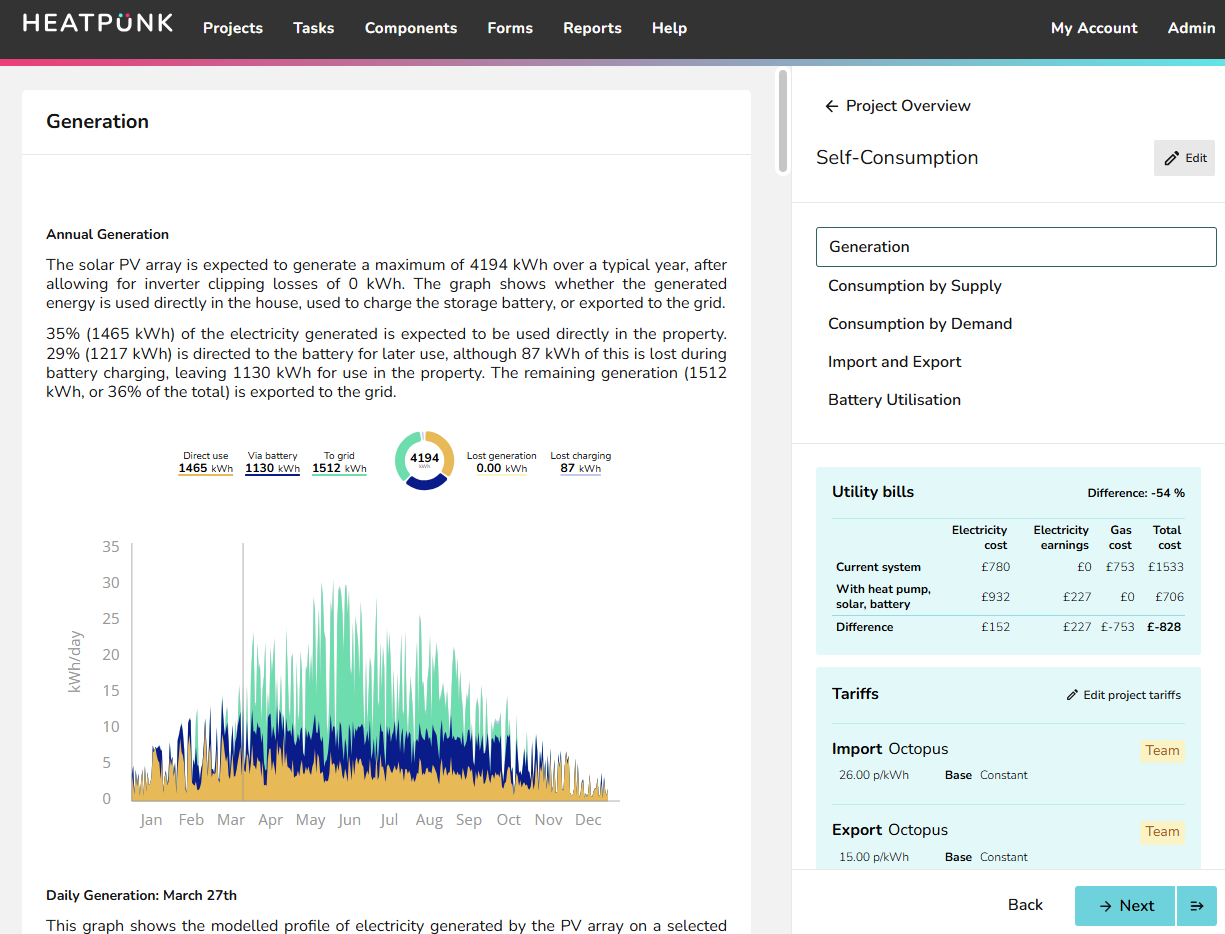
We're adding a new consumption task which will help model running costs and benefits of the proposed heat pump system. This will make it easier than ever to help customers understand the potential returns on their investment and give them confidence that their system will be a good long term choice.
- Benchmark heat pump performance against other energy sources
- Model how different tariffs affect costs and savings
- Include benefits when paired with solar PV and battery storage
- Forecast the long‑term costs and benefits
- Present clear, data‑driven projections that build confidence in your proposals.
This feature is available for early access now, so if you'd like to give it a try, click here to register your interest.
Lots more new features and updates on the way
- Enhanced design tools: new floor plan and system design workflows, plus support for cascade and hybrid systems.
- Pipe sizing: Specify sizing and placement of pipework, including velocity & pressure loss calculations.
- Advanced emitter specification: choose from pre-defined radiator models, towel rails and other heating sources.
- Support for heat batteries and air‑to‑air systems: to support changes to the Boiler Upgrade Scheme.
2025 recap
This year we introduced a wide range of updates to improve accuracy, compliance, and usability:
- Sound assessment updated to support MCS 020 a) in line with England's new Permitted Development Rights.
- Heatpunk.ie launch: tailored for Ireland requirements and regulations. Plus Midsummer Renewables (our Irish subsidiary), started selling heat pumps!
- Compliance and calculation updates including changes to ventilation rate calculations, Performance task updates to meet MCS 031 and updates to ODTs to reflect CIBSE guidance.
- Shrunk Punk: Fresh new look for user interfaces, new leads dashboard, support for quick estimates.
- New forms and reports make compliance a breeze. From heat pump handover documents & service records to BS7671 electrical installation certificates, MCS handover & commissioning checklist, we've got you covered.
- New Installation Record task helps you record information about the install. Upload pictures, record serial numbers, e-signed by installer and surveyor.
- Kit builder in Heatpunk: Automatically spec a full kit list with trade pricing pulled from your Midsummer Wholesale account. Add to Midsummer cart in a single click.
Thank you for using Heatpunk in 2025. We look forward to supporting you in 2026 with more features, integrations, and improvements to help you deliver the best outcomes for your customers.
The Heatpunk Team
New in March 2025
We’re releasing some important updates to Heatpunk to help you keep your project designs and quotes compliant with the latest industry standards.
-
Performance task – The updated performance task will now be applied automatically to all new projects to ensure compliance with MCS 031, which takes effect from 18 March 2025. This update ensures your designs remain fully aligned with the new industry requirements. Learn more about the new task and how this affects your existing projects here.
-
Outdoor design temperature (ODT) changes – We’ve updated the default ODTs to reflect the latest CIBSE guidance. These changes ensure more accurate heat loss calculations, but you can still override the values in project settings if needed. See the full list of updated ODT values and how they impact calculations here.
Join one of our free Heatpunk training sessions to see these updates in action and ensure your designs stay compliant. Book your spot here.
Changes to outdoor design temperatures (ODT)
We are updating our default outdoor design temperatures (ODT) in Heatpunk and will now use the 99th percentile temperature for the relevant project location from CIBSE guide A. This means the temperature will only fall below the ODT for 1% of the year. You may choose to use the 99.6th percentile in which case no additional uplift is needed for intermittent heating or exposed locations (see MIS 3005-d for details). Using the project's location, Heatpunk will also automatically remove 0.3°C from the ODT for every 50 m above sea level.
The ODT of any existing projects created prior to 17 March 2025 will be automatically changed to use the new ODTs.
Please refer to the table below to see the new values which will be used for each postcode region and how this compares with the temperature values Heatpunk previously used. You can also refer to the 'Temp difference' column to see how big the ODT change is between the old and new values for each postcode location.
This will have an impact on the heat loss calculations for all your projects. If you wish to return the project ODT to its original then this can be done by taking the relevant temp from the below table and editing the project ODT within the heat pump task. An additional 0.3°C will need to be removed for every 50 m above sea level, with altitude given in the input section of the technical report & customer proposal.
Outdoor design temps comparison table:
|
Postcode
|
Heatpunk (pre-update) | CIBSE Guide A | Temp difference (°C) between Heatpunk and DB 99% | ||
| Location | ODT (°C) | DB 99.6% (°C) | DB 99% (°C) | ||
| AB | NE Scotland (Dyce) | -4.2 | -5.4 | -3.2 |
+1 |
| AL | Thames Valley (Heathrow) | -2 | -3 | -1.7 | +0.3 |
| B | Midland (Elmdon) | -3.4 | -5.1 | -3.2 | +0.2 |
| BA | Severn Valley (Filton) | -1.7 | -4.6 | -2.9 | -1.2 |
| BB | W Pennines (Ringway) | -2.2 | -4.5 | -2.7 | -0.5 |
| BD | E Pennines (Finningley) | -2.5 | -3.3 | -1.9 | +0.6 |
| BH | Southern (Hurn) | -1.5 | -4.8 | -3.4 | -1.9 |
| BL | W Pennines (Ringway) | -2.2 | -4.5 | -2.7 | -0.5 |
| BN | Southern (Hurn) | -2.1 | -4.8 | -3.4 | -1.3 |
| BR | South-eastern (Gatwick) | -3.2 | -3 | -1.7 | +1.5 |
| BS | Severn Valley (Filton) | -1.7 | -3.1 | -1.5 | +0.2 |
| BT | Northern Ireland (Belfast) | -1.2 | -3.2 | -1.5 | -0.3 |
| CA | North-western (Carlisle) | -3.7 | -3.7 | -2 | +1.7 |
| CB | Thames Valley (Heathrow) | -2.5 | -3 | -1.7 | +0.8 |
| CF | Severn Valley (Filton) | -1.6 | -3.1 | -1.5 | +0.1 |
| CH | W Pennines (Ringway) | -2.2 | -4.5 | -2.7 | -0.5 |
| CM | Thames Valley (Heathrow) | -2.3 | -3 | -1.7 | +0.6 |
| CO | E Anglia (Honington) | -2.3 | -4.6 | -3.1 | -0.8 |
| CR | Southern (Hurn) | -2 | -3 | -1.7 | +0.3 |
| CT | South-eastern (Gatwick) | -3.2 | -3 | -1.7 | +1.5 |
| CV | Midland (Elmdon) | -3.4 | -5.1 | -3.2 | +0.2 |
| CW | W Pennines (Ringway) | -2.7 | -4.5 | -2.7 | 0 |
| DA | South-eastern (Gatwick) | -3.2 | -3 | -1.7 | +1.5 |
| DD | E Scotland (Leuchars) | -3.8 | -5.4 | -3.2 | +0.6 |
| DE | W Pennines (Ringway) | -2.2 | -3.9 | -2.4 | -0.2 |
| DG | Borders (Boulmer) | -3.8 | -5.6 | -3.5 | +0.3 |
| DH | North-eastern (Leeming) | -3.7 | -3.7 | -2 | +1.7 |
| DL | North-western (Carlisle) | -3.7 | -3.7 | -2 | +1.7 |
| DN | E Pennines (Finningley) | -3.4 | -3.3 | -1.9 | +1.5 |
| DT | Southern (Hurn) | -1.7 | -4.8 | -3.4 | -1.7 |
| DY | Midland (Elmdon) | -3.4 | -5.1 | -3.2 | +0.2 |
| E | Thames Valley (Heathrow) | -1.8 | -3 | -1.7 |
+0.1 |
| EC | Thames Valley (Heathrow) | -1.8 | -3 | -1.7 | +0.1 |
| EH | E Scotland (Leuchars) | -3.4 | -5.4 | -3.2 | +0.2 |
| EN | South-eastern (Gatwick) | -2.1 | -3 | -1.7 | +0.4 |
| EX | South-western (Plymouth) | -1.5 | -1.5 | -0.2 | +1.3 |
| FK | E Scotland (Leuchars) | -3.7 | -5.6 | -3.5 | +0.2 |
| FY | North-western (Carlisle) | -2.2 | -4.5 | -2.7 | -0.5 |
| G | W Scotland (Abbotsinch) | -3.9 | -5.6 | -3.5 | +0.4 |
| GL | Midland (Elmdon) | -3.3 | -4.6 | -2.9 | +0.4 |
| GU | Thames Valley (Heathrow) | -2.2 | -3 | -1.7 | +0.5 |
| GY | South-eastern (Gatwick) | -1 | -4.8 | -3.4 | -2.4 |
| HA | Thames Valley (Heathrow) | -1.8 | -3 | -1.7 | +0.1 |
| HD | E Pennines (Finningley) | -3.5 | -4.5 | -2.7 | +0.8 |
| HG | E Pennines (Finningley) | -3.5 | -3.3 | -1.9 | +1.6 |
| HP | Thames Valley (Heathrow) | -2 | -3 | -1.7 | +0.3 |
| HR | Midland (Elmdon) | -2 | -5.1 | -3.2 | -1.2 |
| HS | NW Scotland (Stornoway) | -1 | -5.6 | -3.5 | -2.5 |
| HU | E Pennines (Finningley) | -3 | -3.3 | -1.9 | +1.1 |
| HX | W Pennines (Ringway) | -2.5 | -4.5 | -2.7 | -0.2 |
| IG | Thames Valley (Heathrow) | -1.8 | -3 | -1.7 | +0.1 |
| IM | W Pennines (Ringway) | -2.5 | -4.5 | -2.7 | -0.2 |
| IP | E Anglia (Honington) | -2.3 | -4.6 | -3.1 | -0.8 |
| IV | NE Scotland (Dyce) | -4 | -5.6 | -3.5 | +0.5 |
| JE | South-eastern (Gatwick) | -1 | -4.8 | -3.4 | -2.4 |
| KA | W Scotland (Abbotsinch) | -3.7 | -5.6 | -3.5 | +0.2 |
| KT | Thames Valley (Heathrow) | -1.8 | -3 | -1.7 |
+0.1 |
| KW | NE Scotland (Dyce) | -4.2 | -5.4 | -3.2 | +1 |
| KY | E Scotland (Leuchars) | -3.4 | -5.4 | -3.2 | +0.2 |
| L | W Pennines (Ringway) | -2.4 | -4.5 | -2.7 | -0.3 |
| LA | North-western (Carlisle) | -2.2 | -4.5 | -2.7 | -0.5 |
| LD | Wales (Aberporth) | -2.9 | -3.1 | -1.5 | +1.4 |
| LE | Midland (Elmdon) | -3 | -3.9 | -2.4 | +0.6 |
| LL | W Pennines (Ringway) | -3 | -4.5 | -2.7 | +0.3 |
| LN | E Pennines (Finningley) | -3 | -3.9 | -2.4 | +0.6 |
| LS | E Pennines (Finningley) | -2.5 | -3.3 | -1.9 | +0.6 |
| LU | Thames Valley (Heathrow) | -2.4 | -3 | -1.7 | +0.7 |
| M | W Pennines (Ringway) | -2.2 | -4.5 | -2.7 | -0.5 |
| ME | Thames Valley (Heathrow) | -1.8 | -3 | -1.7 | +0.1 |
| MK | Midland (Elmdon) | -3.4 | -4.6 | -2.9 | +0.5 |
| ML | W Scotland (Abbotsinch) | -3.9 | -5.4 | -3.2 | +0.7 |
| N | Thames Valley (Heathrow) | -1.8 | -3 | -1.7 | +0.1 |
| NE | North-eastern (Leeming) | -3.4 | -3.7 | -2 | +1.4 |
| NG | E Anglia (Honington) | -3.2 | -3.9 | -2.4 | +0.8 |
| NN | Midland (Elmdon) | -3 | -3.9 | -2.4 | +0.6 |
| NP | Midland (Elmdon) | -1.6 | -3.1 | -1.5 | +0.1 |
| NR | E Anglia (Honington) | -2.4 | -4.6 | -3.1 | -0.7 |
| NW | Thames Valley (Heathrow) | -1.8 | -3 | -1.7 | +0.1 |
| OL | W Pennines (Ringway) | -3.2 | -4.5 | -2.7 | +0.5 |
| OX | Midland (Elmdon) | -2.4 | -4.6 | -2.9 | -0.5 |
| PA | W Scotland (Abbotsinch) | -4 | -5.6 | -3.5 | +0.5 |
| PE | E Anglia (Honington) | -3 | -4.6 | -3.1 | -0.1 |
| PH | NE Scotland (Dyce) | -3.8 | -5.6 | -3.5 | +0.3 |
| PL | South-western (Plymouth) | -0.2 | -1.5 | -0.2 | 0 |
| PO | Southern (Hurn) | -1.8 | -4.8 | -3.4 | -1.6 |
| PR | North-western (Carlisle) | -3.2 | -4.5 | -2.7 | +0.5 |
| RG | Thames Valley (Heathrow) | -2.2 | -4.6 | -2.9 | -0.7 |
| RH | Thames Valley (Heathrow) | -1.9 | -3 | -1.7 | +0.2 |
| RM | Thames Valley (Heathrow) | -1.8 | -3 | -1.7 | +0.1 |
| S | W Pennines (Ringway) | -2.8 | -3.3 | -1.9 | +0.9 |
| SA | Wales (Aberporth) | -1.6 | -3.1 | -1.5 | +0.1 |
| SE | Thames Valley (Heathrow) | -1.8 | -3 | -1.7 | +0.1 |
| SG | Thames Valley (Heathrow) | -2 | -3 | -1.7 | +0.3 |
| SK | W Pennines (Ringway) | -2.9 | -4.5 | -2.7 | +0.2 |
| SL | Thames Valley (Heathrow) | -2 | -3 | -1.7 | +0.3 |
| SM | Thames Valley (Heathrow) | -1.8 | -3 | -1.7 | +0.1 |
| SN | Midland (Elmdon) | -2.2 | -4.6 | -2.9 | -0.7 |
| SO | Southern (Hurn) | -1.8 | -4.8 | -3.4 | -1.6 |
| SP | Southern (Hurn) | -1.8 | -4.8 | -3.4 | -1.6 |
| SR | North-eastern (Leeming) | -3.7 | -3.7 | -2 | +1.7 |
| SS | Thames Valley (Heathrow) | -2.3 | -3 | -1.7 | +0.6 |
| ST | W Pennines (Ringway) | -3 | -5.1 | -3.2 | -0.2 |
| SW | Thames Valley (Heathrow) | -1.8 | -3 | -1.7 | +0.1 |
| SY- | Wales (Aberporth) | -3.3 | -5.1 | -3.2 | +0.1 |
| TA | Severn Valley (Filton) | -2.1 | -1.5 | -0.2 | +1.9 |
| TD | Borders (Boulmer) | -3.8 | -5.4 | -3.2 | +0.6 |
| TF | Midland (Elmdon) | -3.4 | -5.1 | -3.2 | +0.2 |
| TN | South-eastern (Gatwick) | -3.2 | -3 | -1.7 | +1.5 |
| TQ | South-western (Plymouth) | -1.3 | -1.5 | -0.2 | +1.1 |
| TR | South-western (Plymouth) | -1.4 | -1.5 | -0.2 | +1.2 |
| TS | North-eastern (Leeming) | -2.9 | -3.7 | -2 | +0.9 |
| TW | Thames Valley (Heathrow) | -1.8 | -3 | -1.7 | +0.1 |
| UB | Thames Valley (Heathrow) | -1.8 | -3 | -1.7 | +0.1 |
| W | Thames Valley (Heathrow) | -1.8 | -3 | -1.7 | +0.1 |
| WA | W Pennines (Ringway) | -2.1 | -4.5 | -2.7 | -0.6 |
| WC |
Thames Valley (Heathrow) |
-1.8 | -3 | -1.7 | +0.1 |
| WD |
Thames Valley (Heathrow) |
-2 | -3 | -1.7 | +0.3 |
| WF | E Pennines (Finningley) | -2.5 | -3.3 | -1.9 | +0.6 |
| WN | W Pennines (Ringway) | -2.1 | -4.5 | -2.7 | -0.6 |
| WR | Midland (Elmdon) | -3.3 | -5.1 | -3.2 | +0.1 |
| WS | Midland (Elmdon) | -3.4 | -5.1 | -3.2 | +0.2 |
| WV | Midland (Elmdon) | -3.4 | -5.1 | -3.2 | +0.2 |
| YO | E Pennines (Finningley) | -3.7 | -3.3 | -1.9 | +1.8 |
| ZE | NE Scotland (Dyce) | -3 | -5.4 | -3.2 | -0.2 |